Browser rendering engines

Converting HTTP responses into pixels
Dr Graeme StuartConverting HTTP responses into pixels
Dr Graeme StuartThe Line mode browser was created by Nicola Pellow, a Leicester Polytechnic student.


Pictured here with Tim Berners-Lee and Robert Cailliau, Nicola is mentioned in the first website!
In 1994, the Mosaic browser was released, enabling images to be included in web pages.



It was eventually renamed to Netscape Navigator - codename: Mozilla.
Microsoft creates Internet Explorer and makes it available for free in 1995.


Defeated, the Mozilla foundation created the open-source phoenix browser which became firefox.
The World Wide Web Consortium (W3C) was founded in 1994 by Tim Berners-Lee.


The Web Hypertext Application Technology Working Group (WHATWG) was founded by Apple, Mozilla and Opera in 2004,
Google release Chrome with faster JavaScript and an open-source version Chromium.


Browsers are marketed based on standards compliance and open source implementations.
CSS was proposed in 1994 by Håkon Wium Lie. The CSS1 specification was completed in 1996.


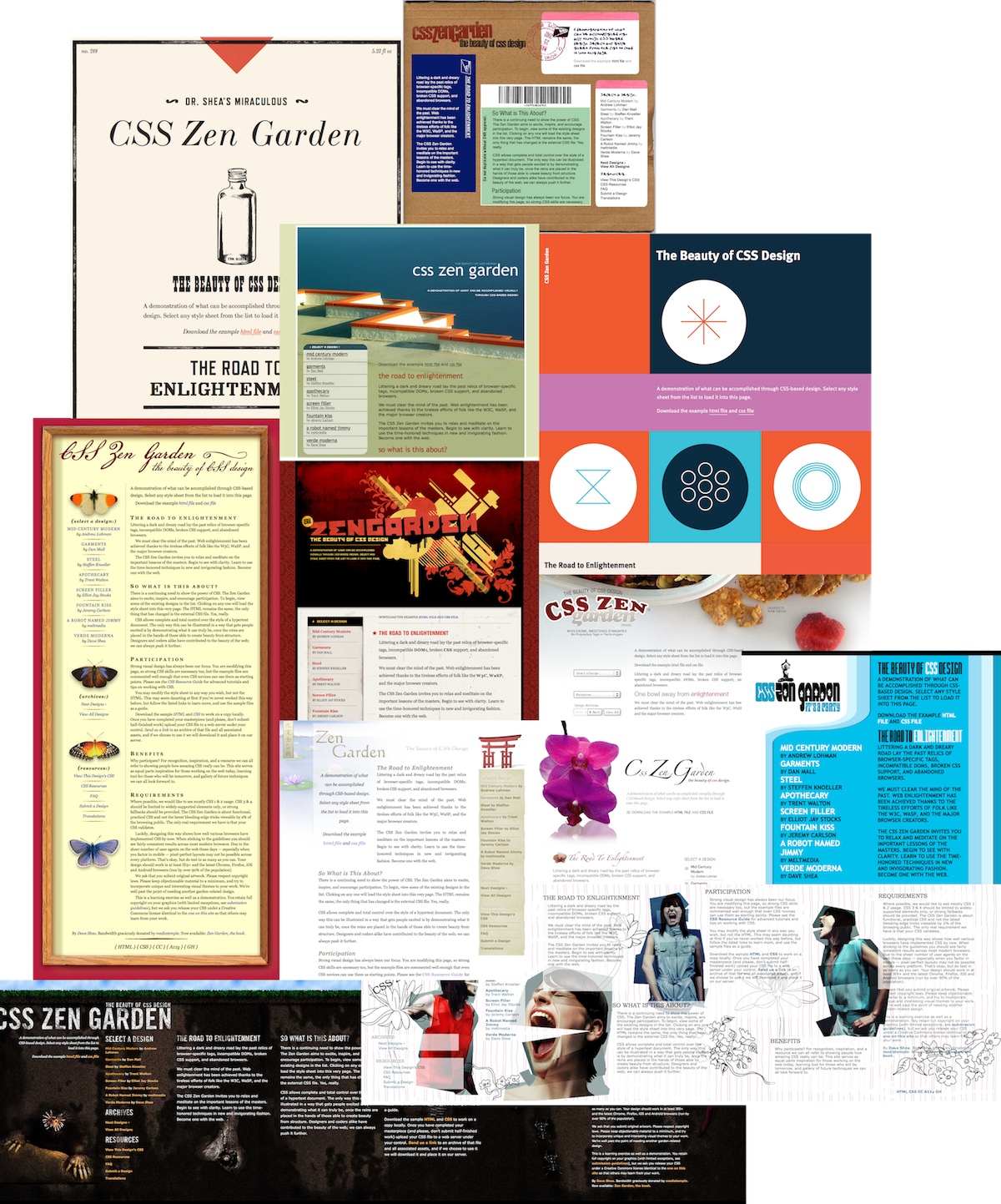
First implemented in March 2000 by IE5 on Mac. CSS zen garden was launched in May 2003.
Essentially there are three types of stylesheets.
Conflicting styles are applied by an algorithm known as the cascade (as in Cascading Style Sheets). The algorithm is fairly complex but for our purposes we can simplify it.
Ideally, we don’t want to include style information within the HTML document itself. So we put all our style information in separate CSS files and use
<link>elements to link these files into our documents.
| |
This is very flexible. A common stylesheet can be used across multiple documents. We can also have multiple stylesheets attached to a single document if we want.
A CSS ruleset consists of a [group of] selector[s] and a declaration block (between curly brackets) containing one or more declarations. Where Each declaration consists of a property name, a colon and a value, followed by a semi-colon.
| |
Typically, each declaration is given it’s own line. One-line formatting is also common but should only be used when there is only one declaration.
| |
Spaces and newline characters are ignored. However, consistent formatting is expected.
CSS declarations are a way to set CSS properties of elements to given values. The selector determines which elements are targetted by the ruleset.
| |
In the above examples the selectors are body, p and a respectively.
CSS declarations can have multiple values, typically separated by spaces or commas.
| |
Some properties are shorthand properties provided for convenience.
| |
The
borderproperty is shorthand for settingborder-width,border-styleandborder-colorsimultaneously.
In HTML, class attributes (
class="student") can be used to identify similar elements. Class selectors (the dot, e.g..student) can be used for selecting elements with a specific class attribute. Similarly, id attributes (id="students") can be selected with a hash (e.g.#students).
| |
| |
Selectors allow us to specify which elements will be affected by a ruleset. There are several patterns (known as combinators) we can use for selectors which allow us to target specific elements.
Separating elements with spaces (e.g.
p a) is the descendent combinator.
| |
Using a greater than symbol (e.g.
p > a) is the child combinator
| |
Using a plus symbol (e.g.
h1 + p) is the next sibling combinator
| |
Read more about selectors and combinators.
Choosing fonts and playing with typesetting can transform the way your site looks.
The CSS fonts exercise provides a basic introduction to how text works in CSS.
The CSS box model is a core concept in CSS, controlling the element size (width and height) as well as the empty space around and within an element.
The CSS box model exercise will walk you through these basics
Web browsers are one of the most complex software applications you will use.

Much of the complexity is in the rendering engine.
The browser rendering engine converts code into pixels through a series of steps. HTML and CSS code is parsed and converted into a nested structure. Styles are determined for each element and applied within the viewport. Positions and dimensions are calculated for each visible element. Pixel colours are calculated for each layer and merged to generate the final result.

Work done in each step can be reused if nothing changes. Although JavaScript and CSS can require steps to be recalculated every frame.
The HTML response body is loaded sequentially as a stream of bytes.


Tokens are combined to form a hierarchy of Nested elements.
Style information are parsed into the CSSOM in a similar way

The DOM and CSSOM are merged into the render tree. Computed styles for all visible elements.
Style information are parsed into the CSSOM in a similar way. The order of styles is important, but styles are not simply applied in order. Styles with higher specificity take precedence over those with lower specificity.
| |
The paragraph has a class and an id. The style declarations below all try to set the
colorproperty. So, there are three potential values, but only one can be applied. Which one is chosen?
| |
The specificity algorithm counts selector components in each weight category (ID, CLASS, TYPE). If competing declarations have the same value, the order in the file will decide.
Note that styles added as inline style attributes will always be applied.
Layout is the process of applying the render tree to the available viewport.

The location, width and height of each element is calculated.
Setting the
displayproperty of an element toinlineorblockwill change the way the element participates in the flow layout. The default value isinline.
A
<span>element has no default styles. The user-agent stylesheet sets some elements (e.g.<div>,<p>) todisplay: blockby default.
By default, content is arranged in a page according to the flow layout. Different elements have different default behaviour. See the default flow layout exercise for more details.
| |
Block elements take up the full width of their container. Inline elements flow like text. Everything flows, wraps and adjusts according to the size of the viewport.
Documentation is usually excellent via MDN (add “MDN” to your search).

e.g. see the documentation for the CSS border property
CSS allows developers to control the style and layout of a document in the browser.


Spend some time in the CSS Zen Garden for inspiration.
If you have any questions, now is a good time to ask.
Thanks for listening
Dr Graeme Stuart

