Contextualisation
A brief history of web technology
Dr Graeme StuartA brief history of web technology
Dr Graeme StuartCommunications infrastructure: telegraph cables 1901 vs internet backbone 2023


Long-distance communications technologies - semaphore, telegraph, telegram, telex, telephone, radio/tv, internet.
Systems are built on what came before. Language allows complex ideas to be communicated. Writing allows ideas to be communicated accurately over long distance and time. Libraries and printing allow for coordinated knowledge management.


“Consciousness is that portion of cognition which is packaged for exchange” - Bret Weinstein
The memex, Vannevar Bush, 1945

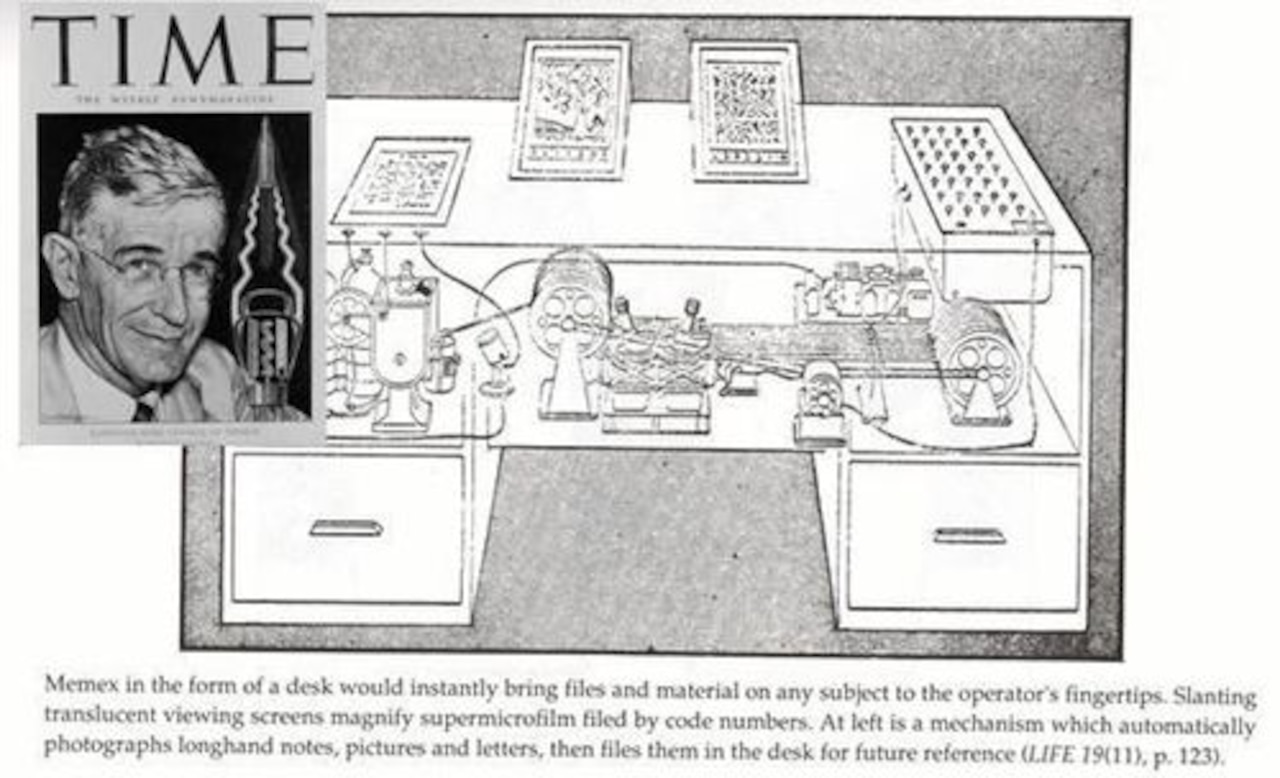
According to Life magazine, the Memex desk “would instantly bring files and material on an subject to the operator’s fingertips”. The mechanical core of the desk would also include “a mechanism which automatically photographs longhand notes, pictures and letters, then file them in the desk for future reference.”
Ted Nelson, Brief Words on the Hypertext, 23 January 1967


“Hypertext is a recent coinage. Hyper- is used in the mathematical sense of extension and generality (as in hyperspace, hypercube) rather than the medical sense of excessive (hyperactivity).”
TCP / IP was standardising networks in the 80’s. The Domain Name System (DNS) emerged. The internet was well established in 1989.


Email was popular. Files were shared using FTP.
The world wide web is an open system for publishing HyperText documents over the internet. It was created in 1989 by Tim Berners-Lee at the Conseil Européen pour la Recherche Nucléaire (CERN).

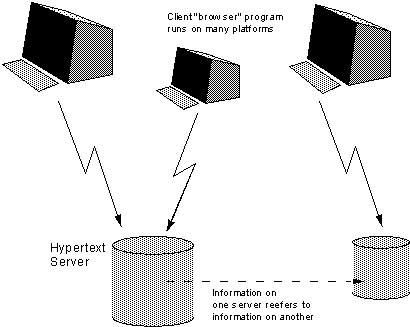
Timbl defined standards for and HTTP and HTML. He also wrote a web server and a web client (browser).
The first website was a very simple hypertext document linking out to more and more documents over time.
Visit it here.
A Uniform Resource Locator is a reference to a resource on a network.

URLs are broken into their component pieces using the pattern described above.
e.g. https://www.example.com/some-document.html?key=value#some-element
Browsers make calls to DNS to lookup the domain name and convert it to an IP address which it uses to communicate to the server.
HyperText Transfer Protocol is the core mechanism for communicating between web clients (browsers) and web servers.

MDN has a great set of pages describing HTTP.
Markup refers to literally making marks on a written manuscript to indicate how it should be treated when printed.


Markup languages add information about the content.
Note that HTML does not include any information about how to format content. It simply indicates what kind of content the various parts of the document are.
| |
This content is marked up using HTML to indicate that the first line is a level 2 heading and the rest of the text should be combined into one paragraph. Emphasis has been added to a few of the words.
ALL HTML5 documents consist of a
<!DOCTYPE html>and an<html>element only. There should be nothing else in the file!
| |
| |
The
<html>element should contains only a<head>element and a<body>element. Nothing else is allowed as a direct child of the<html>element.
Within the
<head>element there should be a<title>element and<meta>element defining the character set. You can also add other information about the document, including linked files and scripts. All the visible content of the page should be inside the<body>element.
| |
HTML documents are the core structure which brings together content which may be served from all over the web.


The browser will make an initial HTTP request to the server for an HTML document. The document may include embedded content requiring subsequent requests.
HTML elements consist of content between matching pairs of tags.

The opening and closing tags are slightly different
Elements can have attributes to add information that should not be considered content. Attributes are key/value pairs separated by an equals symbol.
| |
Attributes are placed inside the opening tag.Attribute values should be contained in “double quotes”. Pay attention to the details.
| |
Some common mistakes include missing the space between attributes and missing quotes around attribute values.
Anchor elements require a hypertext reference (an href attribute) pointing to the link destination as a Uniform Resource Locator (URL).
There are three main kinds of link.
linking to another element
| |
linking to another document
| |
linking to another server
| |
Combinations are common.
| |
The content will become a clickable link.
Clicking the link with induce the browser to issue an HTTP GET request and render the document provided by the server.
Void elements such as
<br>,<img>and<input>are not allowed to contain content. These elements do not require closing tags.
| |
The
<input>element has a value attribute rather than content.
| |
The
<link>and<meta>elements are also void
Semantic elements add meaning to your document structure and provide accessibility advantages. Choosing semantic elements in preference to meaningless elements such as
<div>and<span>adds meaning.
| |
| |
Semantic documents can be understood more fully by the browser and by other software because the various elements have been given meaning.
Accessible Rich Internet Applications (ARIA) present information to assistive technologies to improve accessibility. Adding a
rolewill convert your element into an ARIA landmark.
| |
| |
Most of the newer, semantic elements include these roles implicitly. This makes your HTML simpler and more accessible. See the Chrome A11y podcast for more on accessibility.
It’s difficult to imagine the world before the web.
If you have any questions, now is a good time to ask.
Thanks for listening
Dr Graeme Stuart
